Matchpoint | Accounts payable automation
How I turned invoice discrepancies from a long manual investigation into a manageable workflow inside the product.

1. Context: a discrepancy is not a broken cell, it is a work item
Matchpoint is a service for teams that process vendor invoices.
In the ideal scenario everything is simple: the invoice matches the purchase order and the goods receipt, and it can be paid. In practice the real work starts where the data does not line up.
There can be many reasons for that:
- the price changed after the purchase order was issued;
- the invoice covers the full order, but only part of the shipment arrived;
- extra costs or terms never made it into the purchase order;
- plain mistakes.
The problem is not the discrepancy itself, but the fact that the system usually shows a red flag and never explains what exactly went wrong.
Competitors — Bill.com, Tipalti and Coupa — optimize the happy path and treat exceptions as warnings: the system raises a flag, while the person is left to find the cause, the owner and the next step. I built Matchpoint from the opposite premise: here a discrepancy is not a broken cell in a table but a managed object with a lifecycle — Detect → Diagnose → Route → Resolve → Trace. The scope of this case is Detect and Diagnose, the exact part competitors leave to the user.
Domain. The primary user is an accounts payable specialist (AP specialist) who processes 200–500 invoices a month from 50–100 vendors. Every invoice goes through three-way matching: invoice against purchase order against goods receipt. An exception is any place where the three documents disagree.
Success metrics
- Business metrics: days payable outstanding (DPO), cost per processed invoice, share of payments made on time, late-payment penalties, audit readiness.
- Operational metrics: exception resolution time, share of exceptions closed without escalation, share of false alarms, share of exceptions closed in bulk.
- User metrics: share of discrepancies that can be resolved without leaving the system; time it takes an AP specialist to understand the cause of a discrepancy; share of discrepancies with an obvious owner from the start.
Users
- AP specialist — works through exceptions every day. The main pain is constant switching between documents and systems.
- Manager — steps in when the amount is high or the decision is risky.
- Procurement and warehouse — do not live in the system, but get the questions whenever the issue comes from the order or the receipt.
2. Constraints and scope: two exception types, no real data
A concept, built solo, without real data or live users — every baseline value here needs validation in a pilot.
In scope: a purchase order mismatch and a possible duplicate invoice. Out of scope: stuck approvals, SLAs (service level agreements) and escalations.
3. Discovery: the system finds the discrepancy, the person finds the cause
I started with desk research: reviews of Bill.com, Tipalti and Coupa, public material on accounts payable automation and discussions among AP specialists. One problem repeated across sources: the system finds the discrepancy, and from there the person still works out the cause, the owner and the next step on their own.
Key insights
- A flag with no explanation. The system reports that the invoice “does not match” but shows too little context: which line caused the problem, what exactly it differs from and who is supposed to fix it. AP, procurement and the warehouse end up resolving such cases by hand — through email, chats and calls.
- Automation is not trusted unless confidence is explained. When the system only raises a flag without showing how reliable the signal is, the user starts rechecking everything manually. This matters most for unusual templates, new vendors and disputed data.
- Context leaks out of the system. Once the decision moves into email and messengers, the history is lost fast: who checked what, what they decided and why the invoice was approved or rejected. At month-end this makes the audit harder and slows the close.
- Delay costs money. Stuck exceptions hit the business directly: payments slip, the vendor waits for an answer, the relationship suffers, and some contracts add a penalty for every day of delay.
4. Assumptions: three assumptions in place of the missing data
Without access to real data I made the assumptions explicit: what I assumed, why, and how I would check it.
- Price and quantity are the most common mismatches. I assumed this from desk research, so I built the main screen around a line-by-line comparison. With data access I would check it against the distribution of exception types.
- Automation gets switched off when confidence is not explained. I assumed an AP specialist rechecks a flag manually when the system does not show how well founded it is. That is why the confidence estimate is visible at every stage of working with an exception. I would test this through the share of users who keep the automatic check running versus the share who turn it off.
- A new vendor comes with no baseline. I assumed the first exception has nothing to compare against, so I designed an honest cold-start state instead of false certainty. I would check this on the first invoices from new vendors.
5. Scenarios: three situations where a discrepancy gets expensive
| 1. Critical mismatch before a deadline | 2. Bulk handling of similar exceptions | 3. First invoice from a new vendor | |
|---|---|---|---|
| Situation | Friday, 3:30 PM. The invoice has to be paid on Monday. | End of the workday. The queue holds 34 identical exceptions. | The first invoice from a new vendor arrives. |
| Problem | A $2,580 invoice does not match a $2,100 purchase order. The system shows only that a mismatch exists. | The system does not group similar discrepancies. Every invoice has to be checked separately. | The system detects a deviation, but there is no vendor history yet. |
| What the user does | Compares documents by hand across several windows and messages procurement. | Repeats the same workflow 34 times. | Either sends the invoice through an unnecessary approval or decides blindly. |
| Consequence | A missed payment deadline, a penalty and a delayed next shipment. | More than 100 minutes of routine work, or the risk of missing a real anomaly. | Extra approvals, or the risk of locking in wrong data as the new normal. |
6. Prioritization: all three scenarios converge on one screen
I prioritized the scenarios along two axes: frequency and cost of an error or a delay. On top of that I looked at whether a single solution could close several problems at once.
- Scenario 1 — rare, but expensive per case: one missed payment turns into a penalty and a delayed shipment.
- Scenario 2 — frequent and cheap per case, but 34 repetitions add up to 100+ minutes of routine work.
- Scenario 3 — not about frequency, but about the risk of deciding without history.
All three converge on one task: helping the specialist work through a single exception quickly and with confidence. That is why the main screen became the exception detail — the screen where you can see the discrepancy between the invoice, the order and the receipt, understand why the system flagged it, and pick the next action.
This screen solves the first scenario directly, becomes the basis for handling similar cases in bulk, and lowers the risk of working with a new vendor. Bulk handling removes the repetition in the second scenario, and the vendor profile adds the missing context in the third.
7. Problem statement: the system shows the fact, not the source
- An AP specialist cannot quickly identify the cause of a discrepancy, because the system shows the mismatch without pointing to its source. This leads to reconciling the invoice, the order and the receipt by hand across three windows, and to the risk of a late payment.
- An AP specialist cannot close similar exceptions in one action, because the system does not recognize them as one type. This leads to long stretches of routine work and the risk of missing a real deviation.
- An AP specialist cannot assess the risk of a new vendor, because the system has no history of their invoices. This leads to unnecessary approvals, or to locking in wrong data as the new normal.
8. Solution: the explanation next to the data, not in another window
Everything that explains a discrepancy stays on the same screen as the data itself: the likely cause sits at the line, the vendor’s history and terms sit in the panel on the right, and the available actions are right there. The specialist never has to assemble the picture from three systems and a mail thread. The visual language follows from that: a single white background with no brand color, color carrying status semantics only, and discrepancies marked with weight rather than fills — the attention goes to the data and the explanation, not to the styling.
Signal model
I kept only the signals that help make a decision and that read differently depending on how serious the discrepancy is: system confidence, severity, vendor status, exception type, resolution stage, cause and detection method.
Screen 1. Exception detail
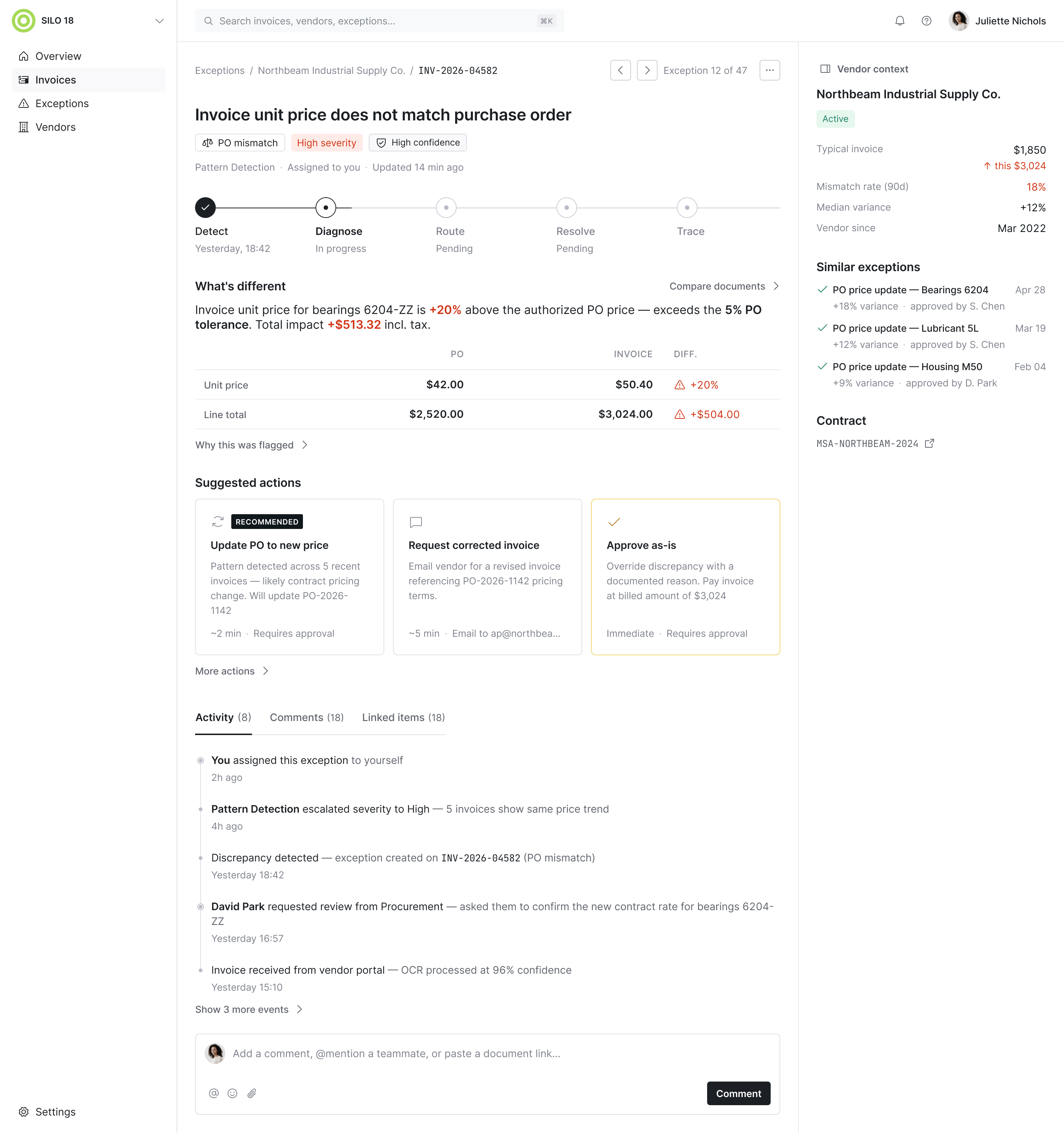
The main screen for working through a discrepancy. The main area shows which fields do not match, and the explanation sits right at the specific line: the cause has to be visible next to the data, not looked up in another window. The system points at the likely source: a vendor price change, an error in the purchase order or an error at receiving.
Hypothesis: showing the likely cause right at the line cuts the time it takes to understand it, because the specialist no longer has to reconstruct the picture from several documents by hand.
On the right is a panel with vendor context: average invoice amount, how often discrepancies happened before, contract terms and related documents. It makes the discrepancy assessable without leaving the screen.
Anatomy of an exception
Every block on this screen answers a question the AP specialist would otherwise chase across tabs, emails and side channels. Every block on this screen answers a question the AP specialist would otherwise chase across tabs, emails and side channels.
Start the step-by-step walkthrough. Start the step-by-step walkthrough.
Start the walkthrough to break the screen down step by step. ← → move the frame between steps · click the screen / Esc — exit
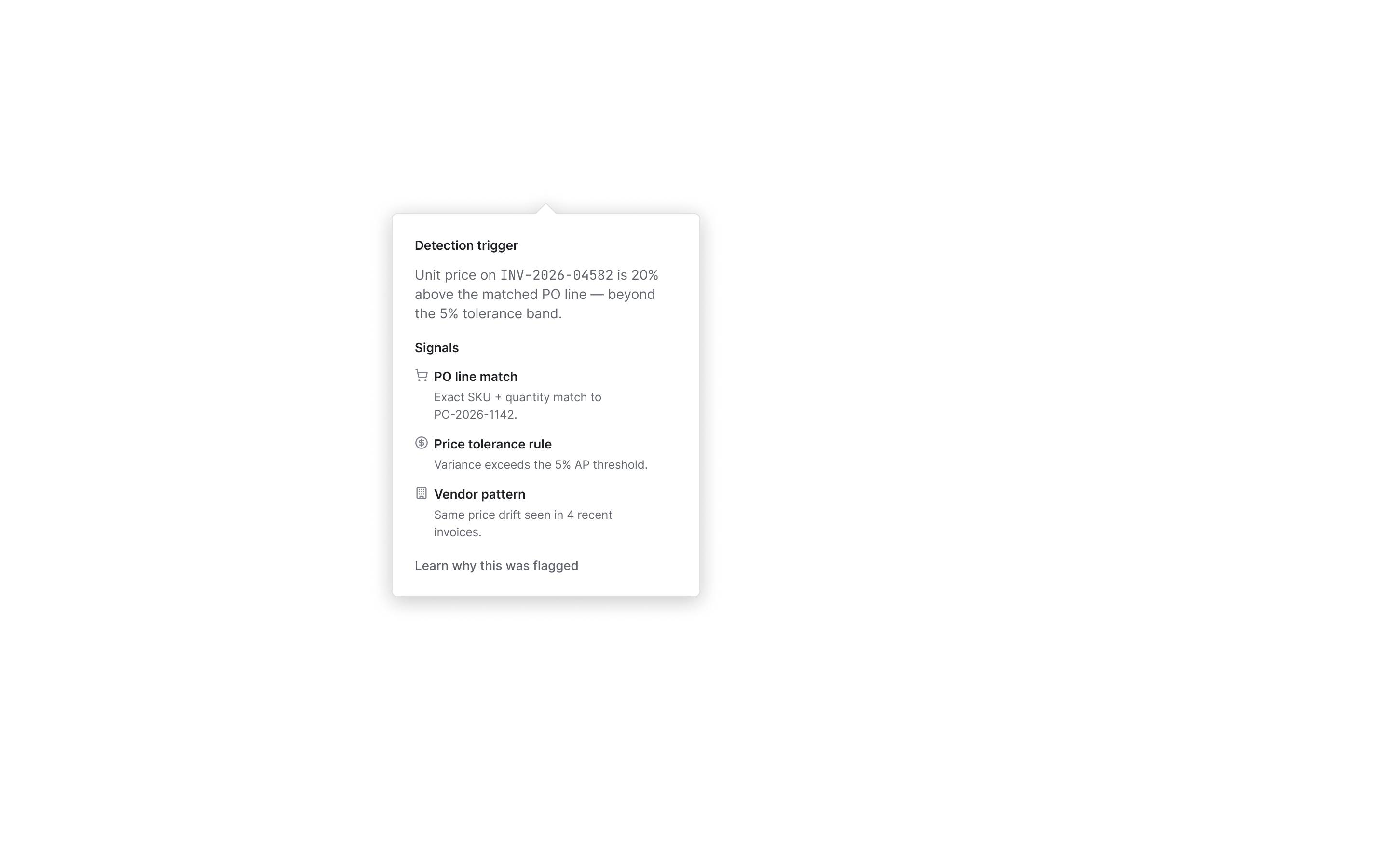
By default I show a table with the differing fields only. The full comparison of invoice, order and receipt is available on request, and the original document can be checked by opening the invoice scan with its recognition results. The tooltip on the confidence indicator explains why the system flagged the discrepancy: it shows the trigger, the supporting signals and the rule that detected it.
Screen 2. Exception queue and bulk handling
The queue separates problem invoices from the normal flow: a discrepancy has to be visible before the specialist starts checking anything by hand. The screen is dense but not overloaded: there are many invoices, so what it owes the user is a fast overview of what needs attention now. Search and filters serve the people who arrive with a specific question.
Similar exceptions can be closed in one action. The grouping is strict: five attributes have to match at once — vendor, discrepancy type, direction of the variance from the purchase order, variance range and the specific field. Outliers are excluded from the batch automatically and stay visible on their own. A batch above $50k or larger than 20 exceptions goes to approval.
Hypothesis: strict grouping and bulk handling cut the total resolution time in the second scenario without raising the risk of closing an important deviation along with the routine cases.
Screen 3. Vendor profile
The profile covers the scenario where a single invoice is not enough. A new vendor has no history yet, and the interface says honestly that there is nothing to compare against, instead of manufacturing a false sense of certainty. Here the AP specialist sees the working context: how much the company usually pays this vendor, how often discrepancies come up, whether any exceptions are open and whether anything changed recently.
The profile brings together the data that usually has to be hunted down in different places:
- vendor status and primary contacts;
- typical invoice size and payment terms;
- discrepancy frequency;
- current balance and open exceptions;
- banking details and contract terms;
- recent activity on the vendor.
This makes it faster to tell whether the problem is in this particular invoice or in how the vendor works in general. From here the specialist can also message the vendor, download the history, update banking details or flag the vendor for extra review.
Core actions
- Update the order — when the invoice is right and the price on the order is out of date.
- Request a corrected invoice — when the error is on the vendor’s side.
- Approve as is — when the discrepancy is acceptable and has to go through.
- Approve part of the amount — when only part of the shipment is confirmed.
- Reject the invoice — when it is a duplicate or a clear error.
- Assign an owner — when procurement, the warehouse or a manager should resolve it.
The owner does not have to be picked blindly: the system suggests the right person based on the type of discrepancy. A price discrepancy goes to the procurement manager, a quantity discrepancy at receiving goes to the receiving supervisor.
Tolerances
Small discrepancies should not look like a serious problem. The rule is simple: the system looks at the absolute amount rather than the percentage — a 30-cent difference does not block a payment even when the percentage looks large. For currency, tax and shipping the reason is shown separately, so the user does not have to do the math in their head or look up a rate in another system.
9. Trade-off: confidence as an explicit status
I weighed a separate status with an expandable explanation against a plain flag. I chose the explicit status. The trade-off: it takes up screen space and adds a layer of interpretation where a binary signal would have done. Without an explanation of confidence, the automatic check gets switched off — a direct finding from the research, and a question of regular use rather than decoration.
10. How I would measure success
The baseline is honestly unknown — I would measure it in a pilot. Targets here are orders of magnitude, not final numbers.
- Time to understand the cause — how long it takes to make sense of a discrepancy.
- Correct-action rate — how often the right action is chosen.
- False-positive rate — how many flags turned out to be unnecessary.
- Share closed in bulk — how much routine work bulk handling removes.
Bridge to the business: these solution-level metrics are leading indicators; the operational ones (time to close, share of escalations) are what they convert into.